InguzTools utilities
This package contains utilities for processing room measurement recordings.
System Requirements
PC, running Microsoft Windows XP Service Pack 2 or later, and .NET 2.0, with at least 2GHz processor, at least 512MB RAM, and at least 10GB free disk space.Linux, per the InguzDSP system requirements, with at least 1GB physical memory (and plenty of swap too).
Installation
To install the tools: Unzip the tools package into a new folder.
Splice Usage
is a command-line utility for combining two single-channel "raw" files into one stereo WAV file.
If you have two correction files from Acourate, called for example (from the left channel) and (from the right channel), then can combine them to create a stereo correction filter suitable for use with InguzDSP on SlimServer.
Open a command prompt, in the folder where you installed the tools.
Type
This will create a new file . Copy this file into the folder
where it can be chosen as a room correction filter by the InguzEQ plugin.
ImpulsePrep Usage
The documentation below is out of date, and new documentation is under development here. Please accept our apologies while this situation persists.
is a command-line utility for preparing room-correction filters in conjunction with DRC.
Its input is two recorded room measurements: one from the left channel of your system, one from the right channel.
Each channel is processed to produce an impulse response.
is run, for each channel's impulse response.
Finally the left and right channels are spliced together to create a stereo correction filter.
DRC configuration
First, install Denis Sbragion's DRC in the same folder as ImpulsePrep.
You should prepare three DRC configuration files: , , and . The standard DRC distribution includes these three configuration files, but you'll need to edit them:
- "BC" (Base Configuration) section: don't worry about these settings; the ImpulsePrep utility sets them automatically.
- "PS" (Target Response stage): start with . If you don't like the results, try again with a different target response such as . Make sure that the file you specify is present in the same folder.
- "MC" (Mic Compensation stage): check that matches your measurement microphone (, etc) and that the file you specify is present in the same folder.
Running ImpulsePrep
Copy your measurement recordings into the folder where you installed the tools. Below I'll assume that these are named and for the left- and right channels of your system, respectively.
Open a command prompt, in the folder where you installed the tools.
Type
You should see the ImpulsePrep version number... and not much else:
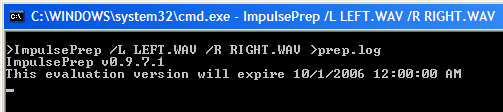
NOTE: ImpulsePrep may take quite a long time to run (10 minutes or more).
Eventually you'll see some more information, and be returned to the command prompt. For example, here's the result after a nearly-successful run:
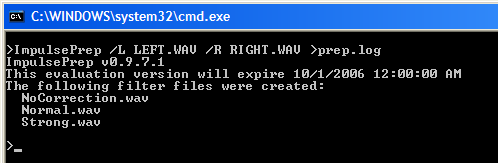
This says that three filter files were created: , and .
There should also be a fourth, . Its absence means that the DRC processing for the configuration didn't complete successfully. To diagnose this, or other messages, you should open the file in a text editor. Make appropriate changes, and try again.
When you have created your correction filter files, copy them into the folder
where they can be chosen as room correction filters by the InguzEQ plugin.
- NoCorrection: a filter which only affects amplitude, not phase. This filter attempts to flatten your room response, but without any true room correction. It's equivalent to the "auto-balance" features on some room-analyzer / equalizer products (in technical terms, this is a linear-phase EQ filter with ERB-based bands).
- Soft: a filter with gentle room correction.
- Normal: a filter with standard room correction.
- Strong: a filter with strong room correction. (Refer to the DRC documentation for more details on the configuration options used for each of these three filters).